

Agentic RAG in n8n: why classic RAG often fails, and how to do it better
Classic RAG often misses context and table data. How an agentic RAG setup in n8n searches knowledge bases more reliably, explained from practice.
Many companies today rely on AI assistants meant to answer questions about their own documents, about meeting minutes, metrics tables, or customer feedback. The common method behind this is called Retrieval Augmented Generation (RAG). It is widely used, well supported, and quick to implement in no-code tools like n8n. The catch: in practice, classic RAG returns wrong or incomplete answers surprisingly often. In his video, Cole Medin shows why that is and how a so-called agentic RAG setup gets around the typical weaknesses. I summarise the key points here.
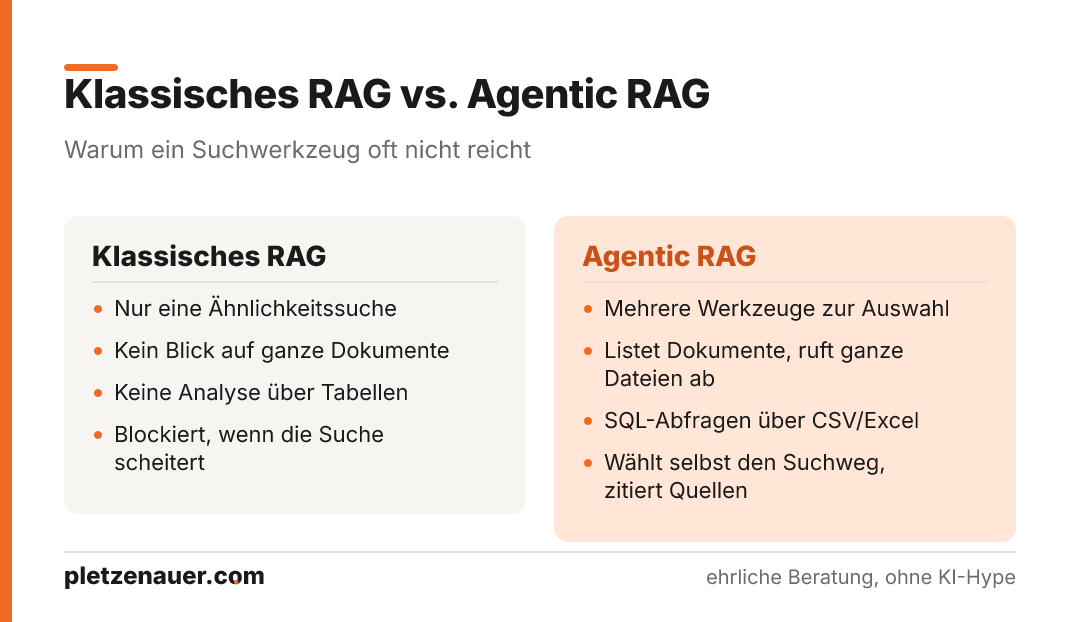
- Classic RAG fails mainly because of two things: it cannot “zoom out” to whole documents, and it cannot perform real data analysis across tables.
- Agentic RAG gives the AI agent several tools instead of just one search, it decides for itself how to query the knowledge base.
- Tables (CSV/Excel) are stored separately so they can be queried via SQL, without creating a dedicated table for each file.
- The agent can list documents, retrieve entire files, cite sources, and improve the search when needed.
- The n8n setup shown is an extensible template, not a finished product, prompts and tools have to be adapted to your own use case.
Why classic RAG disappoints in practice
RAG works through a similarity search: the query is matched against stored text pieces (“chunks”), and the best-fitting ones are passed to the language model. The problem is the selection. It regularly misses important context.
Medin names two concrete weaknesses:
- No view of whole documents: RAG only pulls in individual excerpts. If you want to analyze trends in a table, you might get only a quarter of the rows, and therefore a wrong result.
- No real data analysis: sums or maximum values across a table cannot be calculated reliably with a pure text search.
On top of that, there is a practical annoyance: if you ask for the minutes of a particular date, RAG sometimes pulls the document from the wrong day, even though the date is in the title. And linking different documents together to establish a broader context rarely succeeds.
What agentic RAG does differently
The core idea is simple: instead of giving the AI agent just a single search tool, it gets several, and is allowed to decide for itself how to access the knowledge base. Medin defines agentic RAG like this:
Agentic RAG means giving the agent the ability to reason about how it searches the knowledge base, instead of pinning it to a single tool.
In concrete terms, this lets the agent improve its search queries, choose a different tool when needed, and try several paths until it has a reliable answer. If the pure RAG search fails, it is no longer stuck.
The agent’s four tools
In the n8n workflow, the agent has the following tools at its disposal:
- RAG search, the classic similarity search, in the improved version including source attribution.
- List documents, the agent retrieves all documents along with titles and IDs and considers which might be relevant.
- Retrieve file content, using the file ID, it fetches the full text of a specific document (such as the minutes from February 23, identifiable by the title).
- SQL query over tables. CSV and Excel files are queried like SQL tables, to enable sums, maxima, and similar analyses.
In the system prompt, the agent is instructed to start with RAG and only fall back on the other tools when the search does not return the right thing. An important note from the video: explicitly telling the agent to be honest – that is, to say openly when no answer was found – noticeably reduces hallucinations.
How table data is stored
The technically most interesting part concerns tables. Three tables are created in Supabase for this:
- documents, contains the embeddings for RAG, metadata, and the contents of the individual chunks.
- document_metadata – stores higher-level information: titles, URLs for source attribution, and – for tables – the schema (i.e., the column names).
- document_rows, holds the table rows. The actual data lands in a flexible JSONB column called
row_data.
The trick: with JSONB, you can store arbitrary column structures without having to create a dedicated SQL table for each CSV or Excel file. The agent first reads the schema from the metadata, understands the available columns, and then formulates a SQL query against row_data. Medin explicitly points out that this setup is simplified, the schema, for example, says nothing about data types, so a sum over a column containing dollar signs can fail. He is interested in the concept, not in a perfect implementation.
The RAG pipeline: from Google Drive to Supabase
Before the agent can work, the knowledge base has to be filled. The pipeline runs in several steps:
- Trigger: a Google Drive trigger checks every minute for new or changed files. Dropbox or a local file trigger work as alternatives. Deleted files, however, are not detected.
- Multiple files at once: a newly added loop now also processes several files that arrive in the same polling interval, a known shortcoming of the previous version.
- Deleting old data: before each import, existing entries for the respective file ID are removed. That way, no outdated chunk is left behind when a document has become shorter.
- Extracting content: a switch node branches depending on the file type. PDF, Google Doc, text, or table are read differently. Additional formats such as JSON or HTML can be added via extra nodes.
- Storing tables twice: CSV files are prepared on the one hand as a text document for RAG, and on the other hand stored row by row in
document_rowsfor SQL queries.
A practical pitfall during setup: for the Postgres connection to Supabase, the video says you must use the transaction pooler (port 6543), not the direct connection. The n8n documentation is unclear on this point.
Models used
For the embeddings, OpenAI’s text-embedding-3 is used, and as the language model GPT-4o mini, deliberately chosen to be cheap and fast. For more demanding cases, Medin recommends more capable models such as GPT-4o or Claude Sonnet 4. Important: when inserting and when retrieving, the same embedding model with the same number of dimensions must be used.
Three examples from the video
Medin demonstrates how the agent chooses different tools depending on the question:
- Table question: for “In which month did we have the most new customers?” the agent writes a SQL query and returns the correct result (December, 129 new customers), instead of relying on incomplete chunks.
- Pure RAG question: for “Where can we improve?” the similarity search finds the feedback document, even though the word “improvement” was deliberately not used.
- File retrieval with source: when retrieving a complete meeting protocol, the agent delivers the action items and, on request, a clickable link to the source.
When agentic RAG is the right choice
The video shows in a sober way why naive RAG is not enough for many business applications: it misses context and cannot compute over tables. The agentic approach solves this pragmatically by giving the AI agent several tools and room to decide. For SME decision-makers considering a document assistant, this is an important insight: quality does not stand or fall with the model alone, but with the architecture behind it. If you adopt the n8n setup shown, you should treat it as a starting point, prompts, tools, and the data model need to be adapted to your own data set. The SQL query over tables and the handling of data types in particular leave room for improvement.
Source: Cole Medin – “I Built the ULTIMATE n8n RAG AI Agent Template”, https://www.youtube.com/watch?v=mQt1hOjBH9o
Newsletter
Hands-on notes by email.
New articles and lessons from projects with Claude, WordPress and Zoho. No spam, unsubscribe any time.
Almost done.
Please confirm with the link in the email that is on its way.
Let's talk
Does that sound like your situation?
Tell me briefly what you're working on. I'll tell you whether and how I can help. The call is free of charge.