

Building n8n workflows with Claude and MCP: three tiers at a glance
How to build n8n workflows and AI agents with Claude and MCP servers: three tiers, from copy-paste to fully automated import.
Anyone who works regularly with automation tools like n8n knows the tedious part: clicking individual nodes together, checking JSON by hand, copying workflows from templates. A YouTube video by Mark Kashef shows a different way. With the language model Claude and so-called MCP servers, n8n workflows can be generated from a description in natural language, validated, and ideally written straight into your own n8n account.
I summarise the three presented tiers soberly, put the effort into context, and name the limitations. The goal: a realistic assessment of whether the approach is worthwhile for your business.
- MCP servers give Claude access to n8n documentation, example workflows and the n8n API, so that workflows emerge from a prompt.
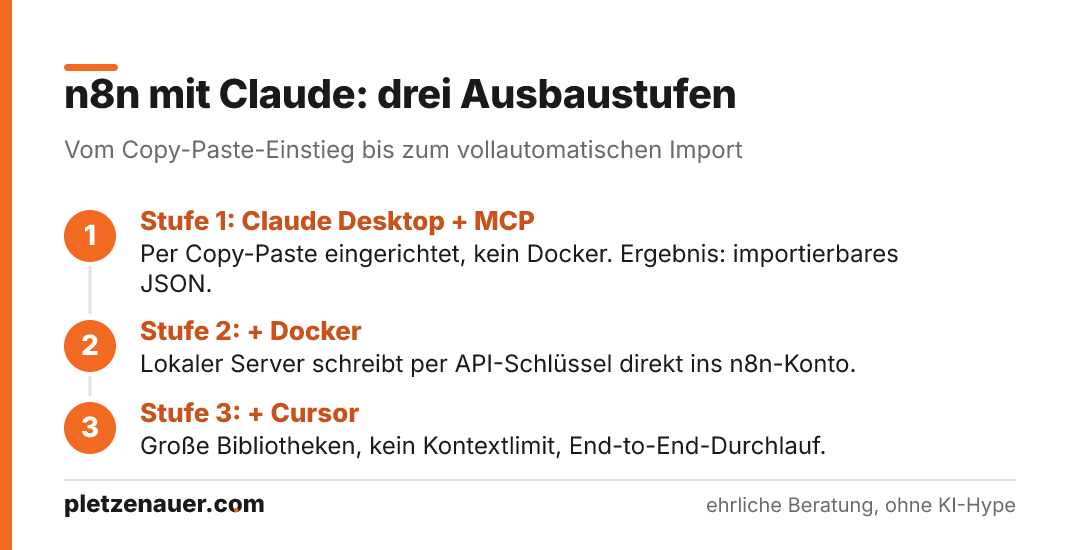
- Tier 1 (Claude Desktop plus MCP only) is set up by copy-and-pasting into a configuration file and is doable without technical background.
- Tier 2 adds Docker so that Claude can write workflows directly into your n8n account via API key.
- Tier 3 additionally combines the Cursor editor to access large workflow libraries without blowing up Claude’s context window.
- The results are functional drafts (roughly 70 to 80 percent), not a finished production state; credentials and fine-tuning remain manual work.
What MCP servers actually do
MCP stands for Model Context Protocol. In the video it is described as a wrapper around an API or an application’s backend service that simplifies communication back and forth. The vivid analogy: previously, each function of an application corresponded to a single door, and for every request you had to create the matching key individually. An MCP server bundles this. One key opens many doors at once.
In concrete terms: instead of hard-wiring every function individually, a single server provides a whole range of functions. In the example, the central n8n MCP server provides 38 different functions, including searching for nodes, loading the documentation and creating complete workflows.
The four building blocks
- n8n documentation: since n8n is largely open source, an MCP server can read the public documentation and thereby recognise which nodes make sense when.
- Workflow library: optional repositories with thousands of example workflows increase the hit rate and reduce hallucinations or faulty nodes.
- Agent examples: if you want AI agents rather than pure A-to-B workflows, you should trigger that in the prompt or supply agent examples. Under the hood, the agent structures are based on LangChain nodes.
- n8n API access: only with a stored API key and URL can Claude actually write workflows into the account.
Tier 1: Claude Desktop plus MCP server
The entry-level variant works without Docker and, according to the video, is suitable for any skill level. In Claude Desktop, the path goes via Settings, Developer, Edit Config. The JSON block of the desired MCP servers is inserted into the configuration file, after which the program is fully quit and restarted.
In the video, three GitHub repositories are combined: a collection of thousands of n8n workflows, the Context7 service for always up-to-date documentation, and the actual n8n MCP server. The matching JSON code is supplied by the tool gitmcp.io, which lets you generate a small MCP server complete with a ready-made configuration snippet from a GitHub repository. The snippets can then be merged by Claude itself into a single configuration file.
Limitation of this tier: without Docker, API access is missing. The n8n MCP server here offers only four functions instead of 38. Claude can therefore generate workflows as JSON that you import manually into n8n, but it cannot write them automatically. In the demo, Claude searches the workflow library for a Telegram example, learns from its structure and generates an importable draft from it. With the Context7 add-on, the same workflow can be refined further using up-to-date documentation.
Tier 2: Adding Docker for direct import
The second tier adds Docker. In the video it is described as a container platform that runs individual applications as isolated containers locally on your own hardware. The advantage: the n8n MCP server runs locally, which is favourable from a security standpoint, and with a stored API key it can write workflows programmatically into the n8n account.
There are two ways to install it. Either the manual download of Docker Desktop for Windows or Mac, or the AI-assisted terminal Warp, which you give instructions to in natural language such as “Download Docker for me”. If an error occurs, Warp suggests the next step, which you can accept with the Tab key. The actual start of the server happens with a single line following the docker pull pattern, complete with a link to the MCP server.
What to watch out for
- The container must be running (green icon) and Docker Desktop must not be closed, otherwise the connection to Claude breaks off and the tools disappear.
- For API access you need the n8n instance URL (the part before the slash) as well as an API key, which is generated fresh in the n8n settings under “n8n API”.
- Both are entered into the JSON block. After that, 38 instead of four functions become visible, including the central n8n_create_workflow as well as reading and editing existing workflows.
Tier 3: Cursor as a knowledge store
The third tier combines Claude Desktop, Docker and the code editor Cursor. The reason lies in a practical limit of Claude: when generating JSON files, the context window fills up quickly, and longer conversations hit limits. Cursor is designed for writing and searching large amounts of code and can reference entire folders with thousands of workflow files without loading everything into Claude’s context.
The MCP servers used in the video (n8n-MCP and Context7) can be set up in Cursor with exactly the same JSON as in Claude Desktop. Conveniently, you can add folders via drag-and-drop – a collection of agent tools or example agent workflows, say – and reference them specifically in the prompt.
Another point is model selection. Cursor offers access to various Claude models and their Max variant, as well as to other language models. If you hit a limit, you can switch the model. The video adds that the Windsurf editor was not used because it was acquired by OpenAI and Claude reportedly discontinued native access to the latest models there.
The fully automated run
In the demo, Claude first plans an agent workflow for a real-estate firm in “Ask” mode, with tools like GoHighLevel, Gmail, Google Sheets and Slack. For execution, it switches to “Agent” mode so that the MCP servers are actually called. The following sequence then runs largely without intervention:
- read the documentation and list relevant nodes
- check node structure and availability (including a health-check query against the n8n account)
- create the workflow, validate it and detect errors
- simplify if needed and repair via partial update rather than rewriting from scratch
- final validation and writing into the n8n account, complete with workflow ID
The entire run took around ten minutes in the example and ended with a functional agent workflow in the n8n account, containing a chat trigger, memory and a language model.
The three tiers compared
- Tier 1 (Claude Desktop plus MCP): low effort, no Docker, no direct import. The result is importable JSON. Good for trying things out.
- Tier 2 (plus Docker): medium effort, a one-time Docker installation. Direct write access to the n8n account via API key.
- Tier 3 (plus Cursor): higher effort, but no context limit, access to large libraries, model switching, and the fully automated end-to-end run for more complex agent workflows.
Putting it into practice
The approach takes repetitive work off your hands and delivers usable starting points. What remains important is the realistic expectation, also stated in the video: a vague prompt produces a simple draft that covers around 70 to 80 percent. The more precisely you describe your own processes, friction points and existing tools, the more tailored the result.
From a consulting perspective, this means: the generated workflows are a starting point, not a finished product. Credentials, data protection, error handling and the domain logic still have to be checked and supplemented. The security aspect of the locally running server (tier 2) is an argument in its favour, but it does not replace sound governance when issuing API keys.
Which tier fits you
The combination of Claude and MCP servers noticeably lowers the barrier to entry for n8n. If you only want to test, tier 1 gets you there without technical hurdles. The direct import (tier 2) and the fully automated build of complex agent workflows (tier 3) require a bit more setup, but in return deliver a process that spares you much of the manual clicking. What stays decisive is the quality of the prompt and a critical review of the results. As a tool for acceleration the approach is useful; you should not mistake it for a self-runner.
Source: Mark Kashef, How to Use Claude & MCPs to INSTANTLY Build n8n AI Agents (MASTERCLASS)
Newsletter
Hands-on notes by email.
New articles and lessons from projects with Claude, WordPress and Zoho. No spam, unsubscribe any time.
Almost done.
Please confirm with the link in the email that is on its way.
Let's talk
Does that sound like your situation?
Tell me briefly what you're working on. I'll tell you whether and how I can help. The call is free of charge.