
Anyone who builds AI agents knows the problem: for every function of a connected service, you have to define a separate tool. Search for a calendar entry, create one, change it, delete it – that quickly adds up to four separate building blocks, and that is for just a single service. With many integrations, the maintenance effort grows accordingly. The Model Context Protocol (MCP) takes a different approach: it standardizes how a language model communicates with a service – and drastically reduces the number of building blocks you need. This post summarizes the concept and a concrete hands-on example with n8n.
- MCP standardizes how a language model understands the context of a service – that is, what it can do and how to address it.
- Instead of connecting every single function separately, an MCP server (in front of the service) and an MCP client (in the agent) are enough.
- The agent gets by with two steps: listing functions (List Tools) and executing functions (Execute Tool).
- In n8n, you can replicate this with an environment variable, a community node, and two MCP client tools.
- MCP is a young technology: there are known security concerns – in production environments, caution is warranted.
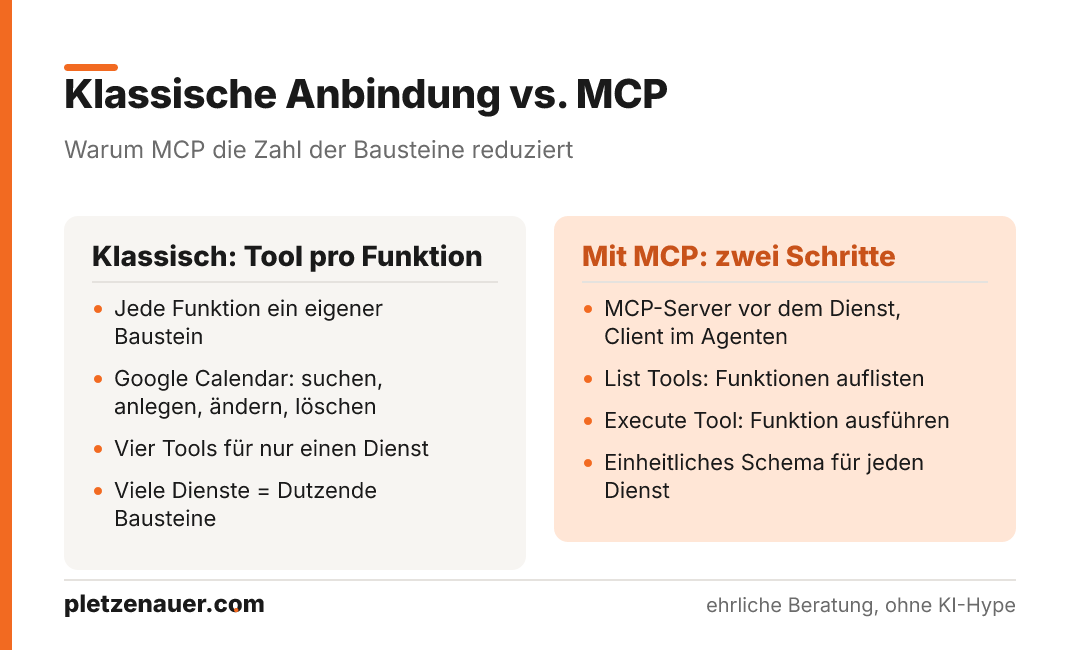
What MCP actually solves
The basic idea of the Model Context Protocol is in the name: a language model should understand the context of an application. In concrete terms, that means: what can this application do? What is it for? And how do I carry out actions in it?
Traditionally, when building an agent, you connect every tool individually – each function is its own building block. With Google Calendar, for example: a tool to search for entries, one to update, one to delete, one to create. Four functions for one service. With complex agents that have many connected services, this quickly adds up to dozens of building blocks.
Server, client, and the unified schema
MCP works with two roles:
- MCP server: sits in front of the actual service (e.g., Airbnb or Google Calendar) and describes how to interact with that service.
- MCP client: sits in the agent and retrieves and calls the server’s functions.
In the current implementation – in n8n, for example – two steps are enough instead of many individual tools:
- List Tools: the agent asks the server which functions are available.
- Execute Tool: the agent calls a specific function with the matching parameters.
The decisive element is the unified schema. No matter which service is behind it, the response to a List Tools request is always structured the same way. Per function, it contains the name, a description, and a schema with the allowed parameters. Contents and parameters differ from service to service – the structure stays constant. That is exactly what the protocol specifies and standardizes.
An example with the Airbnb tool
If you ask the agent what options the Airbnb tool offers, it fetches the function list itself via the List Tools tool. What comes back includes:
- Airbnb Search: search for listings with filters and pagination – such as location, check-in and check-out dates, number of adults, children, infants, and pets, plus price range.
- Airbnb Listing Details: detailed information about a specific listing via its listing ID.
The agent did not need to be given anything here – it obtained the available functions, their descriptions, and the parameter schema by itself. In the schema you see, for example, a text field location (city, state, etc.), the date fields for check-in and check-out, the number of adults, as well as minimum and maximum price.
If you then make a concrete request – say, accommodation in Bangkok for six people at a maximum of 50 euros per night – the agent runs in two stages: it first calls List Tools (it has not memorized anything, since no memory is active), recognizes the necessary parameters from the schema, and runs the search via Execute Tool. The result – say, accommodation with three beds for around 35 euros per night – comes back, and that with only two added tools. If Airbnb offered more functions, for instance to manage your own listings, these could be mapped via the same schema without defining further building blocks.
How to replicate MCP in n8n
The following steps show the setup using the Airbnb example. It is a good one to try out because it does not require an API key.
- Set the environment variable: set
N8N_COMMUNITY_PACKAGES_ALLOW_TOOL_USAGEtotrue. This allows community nodes to access tools. With a Docker installation (e.g., on a Hetzner server), you add this in theenvironmentsection of thedocker-composefile and restart the instance. - Create the AI agent: create an AI agent and assign a model (GPT-4.1 Mini in the video).
- Install the community node: under Settings → Community Nodes, install the
n8n-nodes-mcppackage and confirm the notice about installing unverified code from public sources. - Add the MCP client tool: via the plus next to Tools, search for “MCP.” Caution: do not confuse it with n8n’s own MCP Client Tool – the community variant is recognizable by the box icon and is currently more comprehensive.
- Create credentials: the available connection types are Command Line, Server-Sent Events, and HTTP Streamable. The example stays with Command Line. The correct values are in the repository of the respective MCP server, in the installation section. For Airbnb: command
npx, arguments entered step by step –-y, the package@openbnb/mcp-server-airbnb, and optionally--ignore-robots-txt.
Note on robots.txt: the option
--ignore-robots-txtbypasses a website’s access rules. For a demo, this is acceptable – in production environments, you should respect the robots.txt of the respective services.
Setting up the two operations
Next, you need two MCP client tools with different operations:
- List Tools: name the tool, for example, “Airbnb List Tools” and state in the description that it is used to retrieve all available Airbnb tools. A test click (Execute Step) should return the familiar function list with name, description, and schema.
- Execute Tool: a second MCP client tool with the Execute Tool operation. Description: for executing Airbnb tools, which can be listed via the List Tools tool. You pass the tool name as an expression, so the agent decides for itself which function to call; you leave the tool parameters open so it determines them itself.
After cleaning up and saving, you can test the agent – for instance, again with the Bangkok request. It fetches the function list, returns it to the model, decides on the search, and delivers matching accommodations. Exactly the behavior from the concept section, now in your own workflow.
Beyond n8n – and a word on security
MCP is not limited to automation platforms. Desktop applications such as Claude Desktop can also be connected to MCP servers. This lets you delegate tasks in chat to locally installed programs – a frequently cited example is controlling the 3D software Blender via MCP, where someone with no Blender knowledge creates renderings. The MCP server runs locally, while the language model itself still runs via the cloud service.
For all the enthusiasm, keep in mind: MCP is a young development. There are already security concerns, and security vulnerabilities have been found. In production environments in particular, the technology should be handled with caution – it is worth watching how it develops further before building critical processes on top of it.
Conclusion
The Model Context Protocol is a pragmatic standardization approach: via an MCP server, a language model learns by itself what a service can do and how to address it – instead of predefining every function individually. For complex AI agents, this means noticeably fewer building blocks and less maintenance effort; in the n8n example, two steps are enough: list and execute. The approach is convincing, but still young. If you try it out, you should start with non-critical services and, in production environments, take the open security questions seriously.
Source: Model Context Protocol (MCP): Erklärung & n8n Tutorial (Deutsch) – YouTube channel Philip Thomas.