
A new feature in Claude Code started 41 agents at once, burned through 5 million tokens and used up half a monthly budget in a single run. Impressive, no question. The more useful question is whether you need it at all. In most cases the answer is no, and that is exactly what makes the feature interesting.
The key points
- Dynamic workflows (with Opus 4.8): Claude writes a JavaScript script that runs dozens to hundreds of sub-agents in parallel and merges the results at the end.
- Powerful, but expensive. Every agent is a full Claude call. One workflow can halve a monthly budget.
- Five tools: skill, sub-agent, agent team, /goal, workflow, each for a different kind of job. What separates them: how many agents are involved and whether they talk to each other.
- Depth vs. breadth: /goal repeats until the goal is met; a workflow spreads the work across many agents.
- Short version: rarely needed for knowledge work and automation. Worth it for large, parallel coding jobs.
What this is about
With Claude Opus 4.8, Anthropic introduced a new feature in Claude Code: dynamic workflows. At first glance it adds confusion. There are already sub-agents, agent teams and /goal. Why another concept, and when do you use it, especially given the cost involved?
I am taking that as a reason to keep the five tools apart properly. Not because you need each of them daily, but because it helps to know what a feature does and when it solves a real problem, instead of joining in just because it is new.
Five tools that feel alike
The real difference is simple: how many agents are involved, and can they talk to each other?
- Skill: a reusable recipe. Gets better over time.
- Sub-agent: a parallel worker with its own context window. Does not talk to others, only reports back to the main session.
- Agent team: a small crew with defined roles that coordinates and shares a task list. More expensive.
- Workflow: Claude writes a JavaScript script that orchestrates many agents. Results are merged at the end.
The decisive difference with a workflow: who holds the plan? In a workflow the JavaScript file is the plan, and it can be saved and run again.
The ladder: more power, more risk, more cost
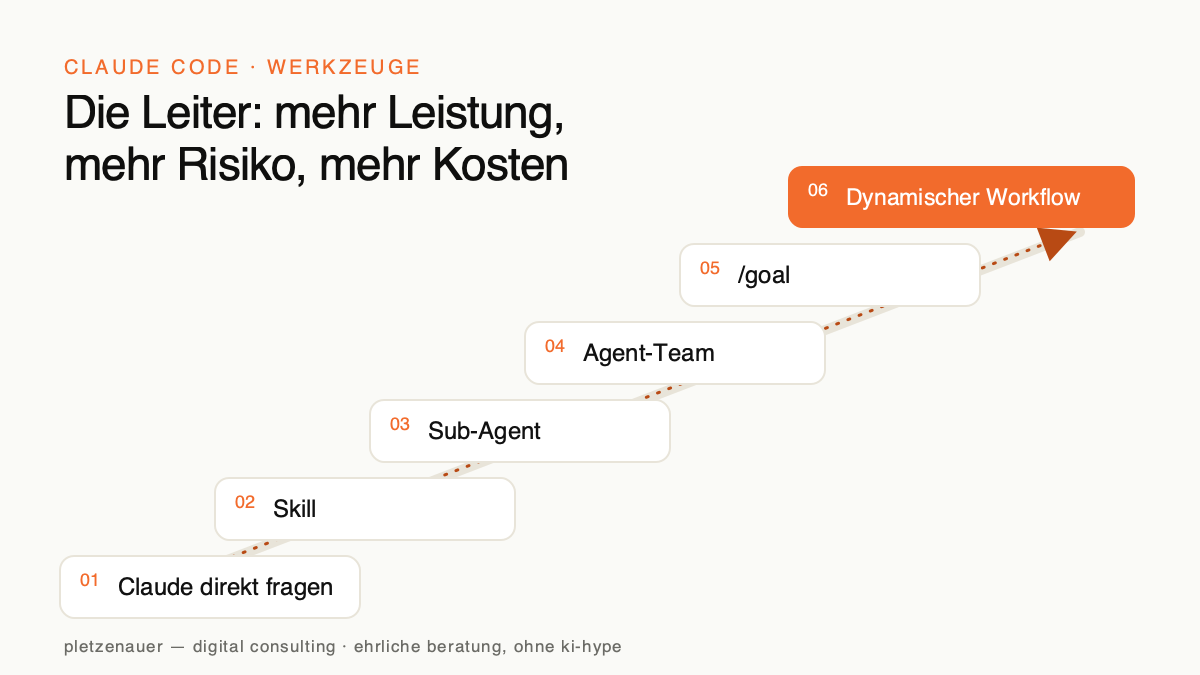
- Just ask Claude: some thinking, a web fetch, an API call.
- Skill: a repeatable process.
- Sub-agent: work running alongside the main session.
- Agent team: parallel workers that talk to each other.
- /goal: a loop until a criterion is met.
- Dynamic workflow: a large, parallel job.
The good news: you do not trigger a workflow by accident. Claude asks first.
Workflow vs. /goal: breadth against depth
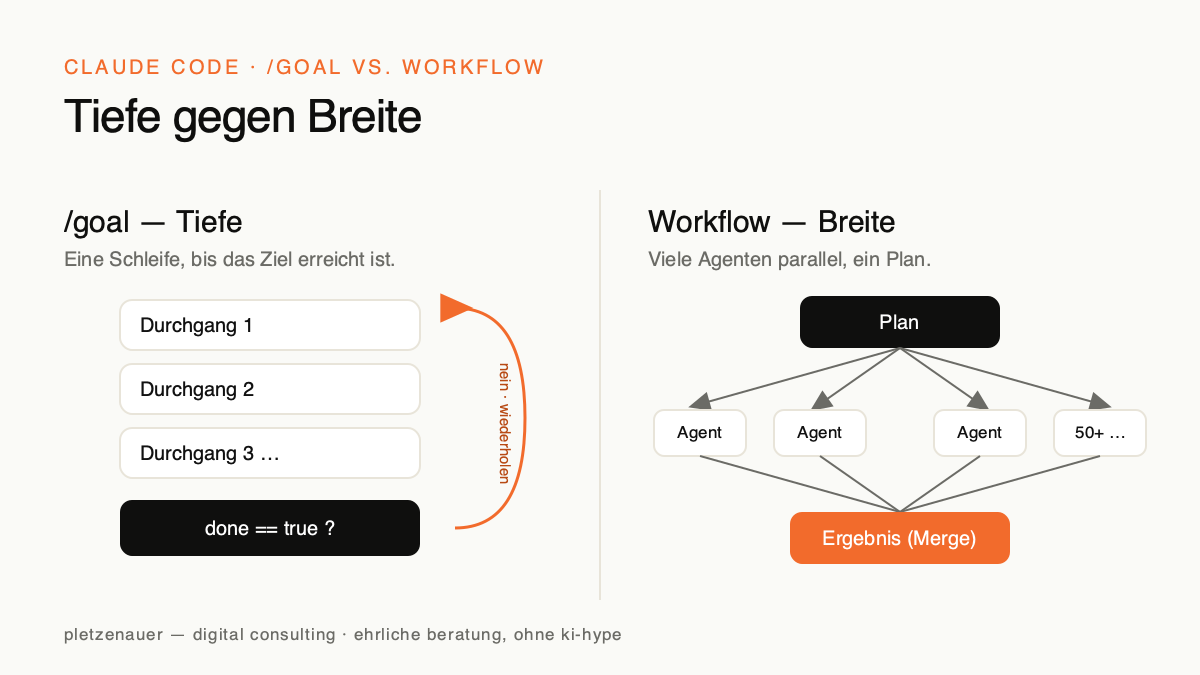
- /goal is depth. A loop that keeps checking whether the goal has been reached. One agent takes several passes.
- A workflow is breadth. Many sub-agents handle different things; everything is merged at the end. They do not check against a “done” criterion, they execute a fixed plan.
The cost question, answered honestly
Every agent is a full Claude call with its own context, and a lot of them get started. Most of the cost lands on the input side, cheaper than output, but it adds up fast.
Three rules, the same discipline as with /goal:
- Narrow the scope.
- Name the result you want.
- Put sub-agents on Haiku wherever you can.
When it actually pays off
Reach for a workflow (or an agent team) when:
- you are reviewing every file in a codebase.
- you have a migration across 400 files ahead of you.
- the stakes are high and every piece deserves maximum compute.
Leave it alone for single changes, quick questions or general knowledge work. The litmus test: does the task break into many independent parts that can run at the same time? If yes, try a workflow.
Two hidden details
Where the script is stored
Workflow scripts land in the global Claude Code working directory by default. For a project, tell Claude explicitly to save into .claude/workflows. After that, running it again is trivial.
ultracode, the most expensive setting
With /effort you set the reasoning level for Opus. There is also ultracode: the smartest and the most expensive. Every prompt becomes a workflow and many confirmations are skipped. One more detail: the word “workflow” lights up in colour while you type, but it does not trigger one on its own. What reliably works: “Set up a dynamic workflow for me that …”
The whole thing on one page
- A quick one-off question → just ask Claude Code.
- Something you repeat → a skill.
- A messy side task → a sub-agent.
- A small crew that coordinates → an agent team.
- Run until a criterion is met → /goal.
- A large, parallel job → dynamic workflows (carefully).
And MCPs, CLIs and API endpoints plug into any of these tools, which is how you connect your own data and systems.
When a workflow is worth it
Dynamic workflows are a strong tool for exactly one case: large tasks that break into many independent, parallel parts. For everything else, a skill, a sub-agent or /goal is usually the more honest and cheaper choice. The skill that matters is not using every new feature, it is recognising when a problem genuinely calls for one. That is the question I ask in every automation project: does this need the heavyweight, or will a lean, rule-based solution do?
Source: Freely adapted from “Claude Code Dynamic Workflows Clearly Explained” by Nate Herk | AI Automation, watch on YouTube. The framing, selection and wording are by pletzenauer — digital consulting.