
Think of Claude Code as a consultant with a small team. You only ever talk to the consultant. He hands subtasks to specialists and reports the result back to you at the end.
That is exactly what sub-agents are. Not hype, but a practical way to divide up work. This post shows when they are worth it, and when they are not.
What a sub-agent is
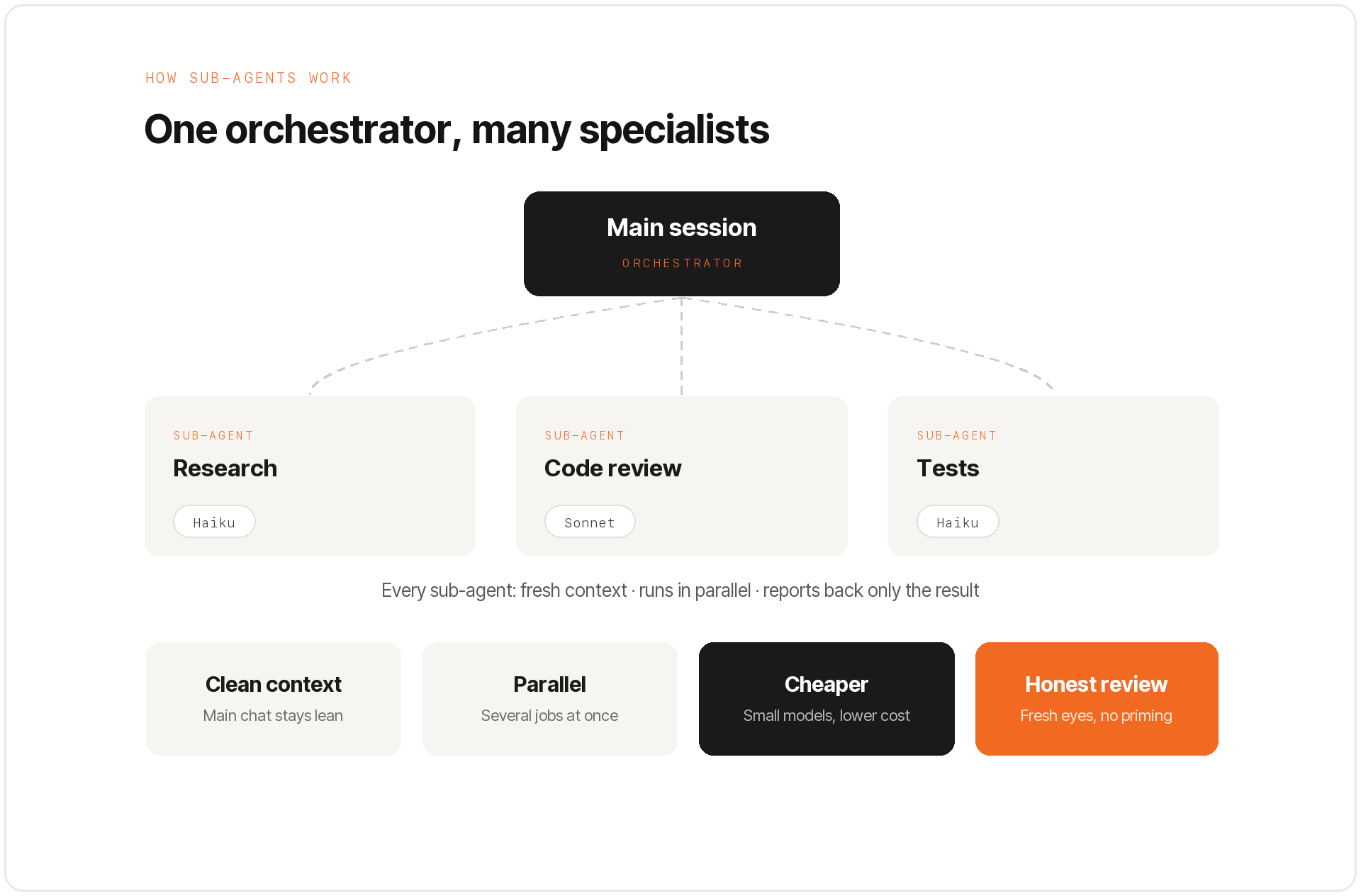
The main session is the orchestrator. It is the instance you talk to. It starts independent sub-agents and assigns them tasks.
Each sub-agent works in its own fresh context. It reports back only a compact result. Sub-agents talk to the main session, never to each other.
Why they are worth it
Four reasons make sub-agents useful.
- A clean context. Research, long logs and large reports stay out of the main chat.
- Parallel work. Many independent tasks run at the same time instead of one after another.
- Cheaper models. A small model does the legwork, a strong one runs the show.
- Honest reviews. A fresh agent has not been primed to agree with you.
Built in or built yourself
Claude Code ships with generic sub-agents. Alongside them you build your own, specialized ones. A sub-agent is nothing more than a Markdown file.
At the top sits the YAML front matter: name, description, model and permitted tools. The description is the most important lever. It decides whether the agent gets matched to the task.
A common mistake in practice is a forgotten quotation mark. The structure breaks, and the agent never starts.
Project or global
Project agents live in the repository and travel with it. Global agents live in your user folder and belong to you alone.
Rule of thumb: if the team should use it, it belongs in the project. Moving it is trivial, because it is only a file.
When a sub-agent, and when not
Not every task needs a sub-agent. Too many of them often produce worse results. One simple question helps.
Is this about to dump a mountain of information into my chat that I will never read again? If yes, delegate. If no, it stays in the main session.
Use sub-agents when a lot of files have to be read, when jobs can run in parallel, or when you want an unbiased review.
Skip them for small edits, for steps that depend on one another, or when the agent would need to ask you a question.
Dynamic workflows and “ultra code”
Since Opus 4.8 there are dynamic workflows. The main session then starts many sub-agents in parallel on its own. That is powerful, but it burns through your session limit fast.
That is why the trigger word was changed from “workflow” to “ultra code”. No large workflow now starts by accident. Reach for the tool deliberately.
Take permissions seriously
If an agent can read or change data, you have to assume it will do so at some point. So grant only the tools it genuinely needs.
For research and review agents that usually means read-only. With agent files from other people, check for possible prompt injection first.
My promise to you
Sub-agents are not an end in themselves. They are a tool for dividing up work. The gain is less noise in the chat, lower cost and an unbiased look at your work.
My promise to you: I recommend sub-agents only where they measurably help.
Note: this post summarizes the core ideas of an English-language YouTube video on Claude Code sub-agents and puts them in a consulting context. Source: youtube.com/watch?v=e18sdZLwP7o.
Frequently asked questions
What are sub-agents in Claude Code?
Sub-agents are independent Claude instances the main agent delegates subtasks to. Each works with its own context and returns only the result.
When are sub-agents worth it?
When tasks are clearly separable, can run in parallel or would overload the main context – such as research, code reviews or searching across many files.
When should I avoid sub-agents?
For small, connected tasks. The overhead doesn't pay off, and an over-split workflow is harder to follow than a single, focused agent.
Do sub-agents cost more?
They use additional tokens because several instances run. In return they save time and keep the context clean. For clearly scoped tasks, that pays off.